

In today’s fast-paced hospitality industry, streamlining reservation management is critical for independent hotels, motels, inns, and resorts. Bookings continuously flow in from a variety of sources, including direct channels (your website, phone, email, social media, and walk-ins) as well as third-party online travel agencies (OTAs) and global distribution systems (GDS).
To prevent costly double-bookings and maximize occupancy, independent lodging operators need a cloud property management system (PMS) with a powerful, centralized reservation calendar. That’s where your hotel tape chart comes in.
At a Glance: WebRezPro Hotel Tape Chart
- Real-time Synchronization: Centralizes bookings from connected OTAs, your direct booking engine, and front-desk entries instantly.
- Interactive Control: Create, extend, or move reservations in seconds using drag-and-drop functionality.
- Smart Front Desk Features: Quick-action pop-ups, click-to-book rate searches, and instant rack rate overrides.
- Nightly & Hourly Stays: Effortlessly manage flexible day-use bookings alongside overnight reservations.
- Housekeeping Integration: Real-time room status syncing helps staff prioritize room turnovers and speed up check-ins.
What is a Hotel Tape Chart and Why Does It Matter?
A hotel tape chart is the visual core of any property management system. It provides a live grid view of room availability, bookings, and housekeeping statuses across your property.
In modern cloud PMS platforms like WebRezPro, the tape chart isn’t just a static display—it’s an interactive control center. Staff can manage rooms and reservations in real time directly from the calendar, saving time and improving the guest experience.
Real-time Information for Optimizing Room Assignments and Occupancy
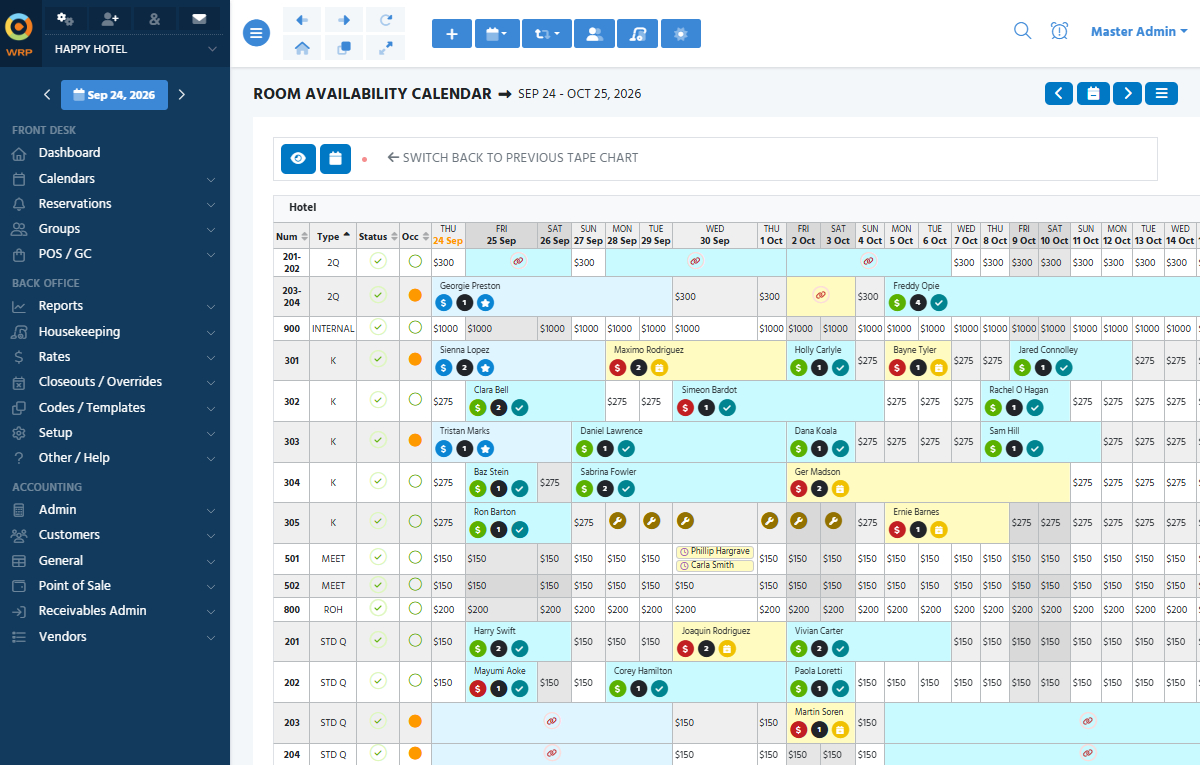
Featuring a clean, modern design, the WebRezPro tape chart offers an at-a-glance view of live room availability and booking statuses, making it easy to optimize room assignments and keep track of reservations across dates.
Key Availability & Visibility Features:
- Centralized Reservation Management: Integrated with third-party channels (like Booking.com and Expedia) and your direct WebRezPro website booking engine, the tape chart automatically updates in real time. This prevents overbookings while helping staff identify gaps and optimize room assignments to reduce vacant nights.
- Intuitive Calendar Navigation: Effortlessly jump across dates using quick-navigation tools, including a date range picker, calendar toggle arrows, and instant “jump-to-today” and “jump-to-tomorrow” buttons.
- Customizable Sorting and View Options: Sort the calendar by unit type, room number, housekeeping status, or occupancy status, and set additional preferences—such as hiding unassigned reservations or displaying total guest counts and nightly room sales—to tailor the chart to your needs. Properties with multiple accommodation types, e.g., campsites and motel rooms, can segregate views by location.
- Clear Visual Cues & Status Icons: Color-coded reservation blocks give staff immediate clarity on booking statuses (e.g., checked-in, payment owing, VIP, complimentary reservations, etc.), while icons quickly flag room close-outs, group blocks, housekeeping status, and other pertinent availability information.
- Supports Nightly & Hourly Stays: If your property offers day-use bookings, the tape chart displays both nightly and hourly reservations side by side. Front desk staff can track short-stay availability at a glance without switching views or managing separate systems.
- Seamless Housekeeping Integration: The tape chart syncs directly with the housekeeping report to display real-time room statuses. Front desk agents know exactly when a room is clean and ready for guests, while housekeepers can prioritize cleaning based on actual arrivals and departures.
Interactive Features That Save Time and Elevate Guest Satisfaction
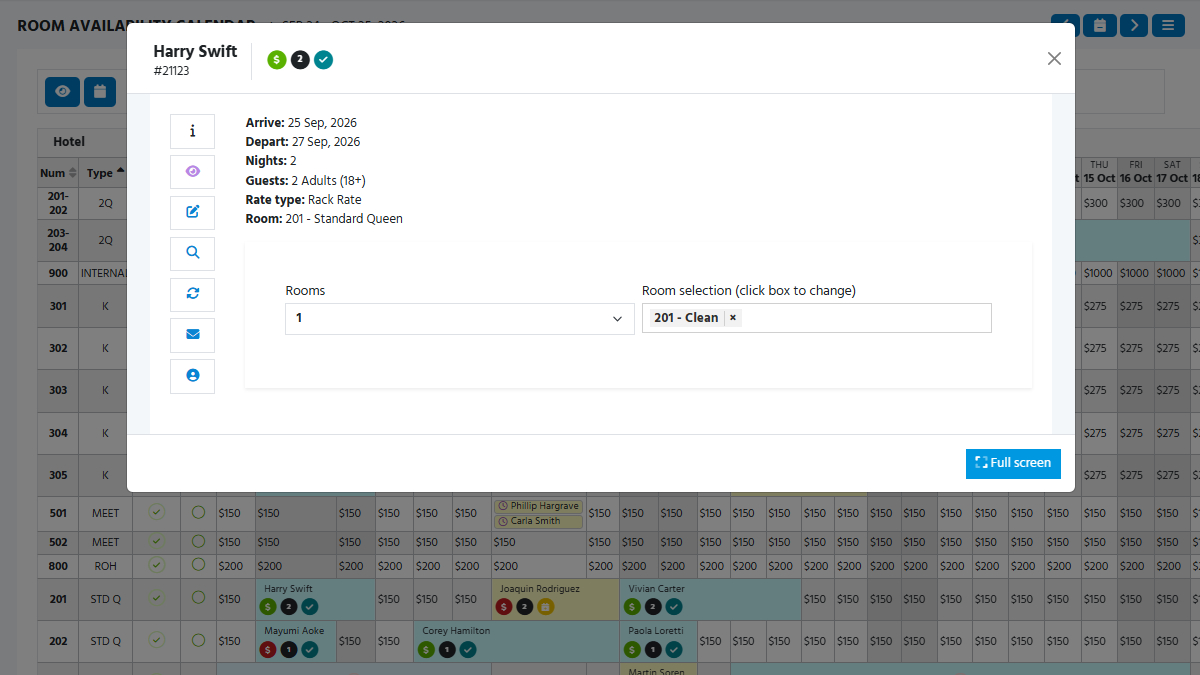
WebRezPro’s interactive tape chart goes beyond a clear view of availability by letting staff execute actions straight from the grid. From creating and editing bookings to moving reservations to different rooms, and even overriding the rack rate, fast front-desk workflows lead to shorter guest wait times and higher satisfaction scores.
Key Interactive Features:
- Click to Book: Click any available room cell to initiate a new reservation. Rack rates are displayed on the calendar by default, but staff can search all rates or specific packages instead. To book multi-night stays, simply click and drag across your desired date range.
- Drag-and-Drop Room Reassignments: Need to extend a stay or change a guest’s room? Just drag and drop the reservation to the new room or date. If moving to a different room tier, the system gives you the choice to recalculate the rate or issue a complimentary upgrade.
- Quick-Action Reservation Pop-ups: Click on a reservation to open a quick-detail pop-up showing the most important information (guest name, confirmation number, stay dates, room number, guest count). Perform core tasks—like checking guests in/out, applying payments, or emailing confirmations—without opening the full reservation folio itself, minimizing clicks and maximizing productivity.
- On-the-Fly Rack Rate Overrides: Authorized front desk staff can override rack rates directly from the tape chart, allowing for swift, flexible rate adjustments for specific rooms and dates.
Streamline Your Front Desk Operations with WebRezPro
A good tape chart is essential to smooth hotel operations. WebRezPro’s interactive tape chart combines real-time inventory syncing with drag-and-drop management and housekeeping integration to give independent hoteliers the flexibility and control required to run an efficient and profitable property.
Want to explore how our interactive tape chart and automated PMS features can save you time? Let our team show you around with a free demo.
Frequently Asked Questions (FAQs)
A hotel PMS tape chart is a digital calendar grid that visually displays room inventory, current reservations, room statuses, and availability. It serves as the primary operational view for front desk staff to manage bookings and room assignments.
Yes. Staff can drag and drop bookings to extend stays or move guests to different rooms, click on bookings to access quick-action pop-ups (edit booking details, complete check-in/check-out, apply payments, and send emails) without leaving the tape chart.
WebRezPro’s tape chart features real-time two-way synchronization with your direct online booking engine and connected third-party OTAs. When a room is booked on any connected channel, inventory is immediately updated across those platforms and on your tape chart.
Absolutely. WebRezPro allows you to filter and sort the tape chart display by unit type, location, and more, making it ideal for hybrid properties that offer combinations of hotel rooms, cabins, or campsites.
Yes! The WebRezPro tape chart displays both nightly and hourly stays directly on the calendar grid, making it easy to manage flexible room inventory and maximize revenue from day-use reservations.
